Many Black Friday prices are fake, or at least flattering: the “was” price is often a number the item rarely sold at, so the discount looks bigger than it is. The way to see the real price is to ignore the crossed-out number, check what the item actually cost in the weeks before, and compare it across retailers before you buy.
None of this requires a spreadsheet or a stern personality. It requires about ten minutes of setup in early November, and a few rules you apply every time a big red banner tries to rush you. Here is the whole system.
Set up your price-checker before the sales start
Capital One Shopping is a free browser extension that tests coupon codes automatically at checkout, compares the same item across other retailers, and keeps a watchlist so you can see when a price really drops. Add it now, while prices are still honest.
Add Capital One Shopping free →How a fake discount is built
A fake Black Friday deal almost never involves a lie you could catch in court. It involves a reference price, and reference prices are slippery. A few of the common constructions:
- The inflated “was” price. The list price (MSRP) is a number the manufacturer suggests, and plenty of products rarely or never sell at it. Cross out a price nobody pays and a normal street price looks like a steal.
- The creep-up. A retailer nudges a price higher in October, then “drops” it in November to roughly where it started. You get a banner, they get a sale, and nothing changed.
- The Black Friday edition. Some products sold in November are versions made for the sale: a slightly different model number, fewer features, cheaper parts. They are not the thing that was discounted last spring, and comparing them to it is meaningless.
- The doorbuster you cannot buy. A handful of units at a headline price pull you in. Once they are gone, you are on a page full of regular-priced neighbors.
- The bundle fog. Add a case, a cable, and a gift card, call it a bundle, and the per-item price becomes impossible to compare. Sometimes that is the point.
Notice what these have in common. Every one of them depends on you looking only at the sale page. The fix is to bring your own number.
Step one: find the real price history
The only price that matters is what the exact item has sold for recently. Before November, pick the three to five things you actually plan to buy this season and write down what they cost today. Not what the page says they are worth. What you would pay if you clicked buy right now.
Then keep watching. This is where a watchlist earns its keep, because nobody remembers what a pair of headphones cost six weeks ago. With a free tool like Capital One Shopping, you add the item while you browse it, and it keeps an eye on the price for you. When the number moves, you see whether it moved down for real or just jiggled.
Some things to look for when you read a price history:
- Has it hit this price before? If the “Black Friday low” matches a random Tuesday in August, it is a fine price, but it is not a Black Friday price. You did not need to wait.
- Is the drop recent or ancient? A price that has been the same for months is the price. The banner is decoration.
- Where is the floor? Most products have a lowest price they bounce off. If today’s number sits at the floor, buy. If it sits well above, wait.
One honest caveat: a price history tells you about the past, not what happens next. Prices can go lower than they ever have, and an item can sell out at a good price. The goal is not to time the absolute bottom. It is to avoid paying a markup dressed up as a markdown.
Step two: compare the same item across retailers
Black Friday does not happen at one store. The same model is usually sold by several big retailers at once, and during the sales they trade punches. One matches the other, one undercuts it, one throws in a gift card that changes the math.
You can check this by hand with a handful of open tabs, which is fine for one purchase and miserable for ten. A price-comparison extension does the tab work: while you view a product, it looks for the same item elsewhere and shows you if someone is selling it for less, shipping considered. That second part matters. A price that is lower before shipping and higher after is not lower.
A few ground rules when you compare:
- Match the exact model number. “Similar” is how you end up with the stripped-down sale edition.
- Count shipping and returns. A slightly cheaper price from a retailer with a painful return policy is not a win on something you have not tried yet.
- Check who is actually selling it. On big marketplaces, the listing and the seller can be different things. Look for the retailer itself or a seller you recognize.
Step three: don’t pay for a coupon you could have found
Here is a small thing that quietly adds up. At checkout, there is often a box labeled “promo code,” and your instinct is to leave a tab, search for codes, paste six that do not work, and give up. Coupon autofill takes that off your plate. The Capital One Shopping extension tests available codes automatically at checkout and applies whichever one works, if one does. When none do, it does nothing, which is also fine.
We covered the whole tool, including what it does not do, in our full review. The short version: it is free, it works in the background, and it is most useful on exactly the kind of mid-priced stuff everybody buys in November.
Two products worth the patience, and one worth skipping the wait for
Here is how that system plays out with real categories. Headphones are a classic Black Friday buy, and also a classic category for confusing sale pricing, because there are so many near-identical models.
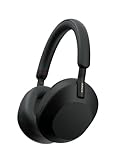
On the other side of that spectrum, there are inexpensive things where waiting for the perfect price costs you more in attention than you could save.
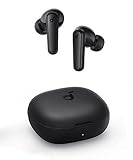
That is the point of the middle step. Put your energy where the money is. A big-ticket item deserves a watchlist and a week of patience. A $45 item deserves a two-minute comparison and a decision.
What to skip
Part of beating Black Friday is refusing most of it. Here is what we would skip:
- Skip anything you did not want in October. A discount on something you did not need is just a purchase.
- Skip the countdown timer. Urgency is a sales technique. If a deal is real, it will usually come around again in some form, and if it does not, you will survive.
- Skip the “percent off” headline. Percent off what? Compare the final price to what you wrote down, not to the crossed-out one.
- Skip the doorbuster, unless you are online at the right second. They are real, they are limited, and they are bait. Do not rearrange your day around a deal you may not get.
- Skip unfamiliar sellers with famous-brand prices. If a price looks impossibly low on a name-brand item from a store you have never heard of, the problem is usually not your luck.
- Skip buying early just to “lock it in.” Many retailers allow returns or price adjustments, but the rules vary. Read them before you rely on them.
The one-page plan
If you take nothing else from this, take this routine:
- This week: list the three to five things you actually want, and install a price-checking extension.
- Before the sales: add each item to a watchlist and note today’s price.
- During the sales: when a price drops, check it against that history and against other retailers, with shipping.
- At checkout: let coupon autofill try its codes before you pay.
- Afterward: keep the receipt and check the return window.
None of that is exciting, and that is exactly why it works. The fake-price machine runs on excitement.
Do the boring setup now, enjoy the sales later
Add the free extension today and let the price comparison, auto coupons, and watchlist work in the background while you shop. By the time the banners go up, you will already know what a good price looks like.
Get the free extension →Frequently asked questions
Are Black Friday deals actually real?
Some are, and some are not. Genuine discounts exist, especially on items that are discounted at that time of year anyway. But many headline discounts are measured against an inflated list price, so always compare the final price to what the item sold for recently, not to the crossed-out number.
How can I check if a price is really a good deal?
Look at the item’s recent price history and compare the exact model across several retailers, counting shipping. A free extension like Capital One Shopping can keep a watchlist and show cross-retailer prices as you browse.
When should I start tracking prices?
As early in November as you can, and earlier for big purchases. The longer your baseline, the easier it is to tell a real drop from a fake one.
Is Capital One Shopping free to use?
Yes. It is a free browser extension. It automatically tests coupon codes at checkout, compares prices across retailers, and lets you keep a watchlist of items. You do not need to be a Capital One customer to install it.
Should I wait for Cyber Monday?
Often there is no big difference, since many retailers run sales across the whole week and beyond. If your watchlist shows a price at or near the item’s lowest point, buy it rather than gambling on a better one later.
Are Black Friday editions of products worse?
Sometimes. Certain products are sold in versions made specifically for sales events, with different model numbers or fewer features. Match the exact model number before you compare prices, and be wary of a sale price on a model you cannot find in earlier months.
What should I do if the price drops after I buy?
Check the retailer’s price adjustment and return policies before you buy, since they vary. If the window is still open, you may be able to get the difference back or return and rebuy.