Walking pads had a very specific pandemic-era origin story — a wave of TikToks showing people quietly walking through Zoom calls, then a wave of $180 no-name units showing up on doorsteps, then a wave of those same units getting listed on Facebook Marketplace six months later because the belt started squealing and the remote stopped pairing. Three years on, the category has settled. There are walking pads that hold up, stay quiet enough for a real workday, and genuinely change how much you move without a separate hour carved out for the gym. There are also still plenty of the squealing kind. Here's how to tell the difference, and what to build around one if you buy it.
- Top pickVIVO Single Monitor Desk Mount Arm~$35
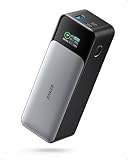
- Worth the splurgeAnker 737 PowerCore 24K~$130
What a walking pad actually is (and isn't)
A walking pad — also sold as an under-desk treadmill — is a flat, low-profile treadmill with no incline, no handrails, and a speed range that usually tops out around 3.5 to 4 mph. That ceiling isn't a design flaw. It's the point. These aren't built for running or even a brisk power-walk; they're built for a pace you can hold while typing, reading, or sitting through a meeting with your camera off. Most fold to about 4 to 6 inches thick and slide under a bed or couch when you're not using them, which is the entire reason they exist instead of a regular folding treadmill taking up a permanent corner of a room.
What it isn't: a replacement for actual cardio training. If you want to run intervals or train for a race, you want an incline-capable treadmill with a higher top speed and a sturdier frame. A walking pad is a low-intensity, high-frequency tool — the value isn't in any single session, it's in quietly adding 5,000 to 8,000 steps to a day that would otherwise be almost entirely seated.
Who actually benefits from one
The honest answer: people who work from a desk most of the day and have noticed their step count cratered since they stopped commuting or stopped having a reason to walk anywhere. If you already hit your steps naturally — a job that keeps you on your feet, a dog that drags you around the block twice a day — a walking pad solves a problem you don't have. But if your workday step count lives in the 2,000 to 3,000 range, a walking pad under a standing desk is one of the highest-leverage health purchases available, because it doesn't rely on willpower the way a scheduled workout does. It's just there, every single day.
It's also worth being honest about who it doesn't work well for: anyone whose job involves precision mousework or a lot of typing-heavy focus work, where even slight motion breaks concentration. Most people can walk and type slowly at 1 to 1.5 mph — very few can walk and do detailed spreadsheet work at 2.5 mph without more typos than usual. Match your pace to your task, not the other way around.
The belt, the motor, and the noise — what separates good from bad
This is where the $150 no-name units fall apart, and it's almost always one of three components. The belt: a good walking pad uses a thicker, textured rubber belt with real tension adjustment built in. Cheap belts are thin, slip under bodyweight within a few months, and start making a rhythmic slapping sound that gets worse, not better, over time. The motor: look for a continuous horsepower rating (not peak horsepower — that number is marketing) of at least 2.0 CHP for daily five-day-a-week use. Anything lower tends to overheat and shut down mid-session once you've had it a year. The deck: a shock-absorbing, multi-layer deck under the belt matters more than people expect — it's the difference between your knees feeling fine after an hour and feeling it by 3pm.
Noise is the deciding factor for anyone on video calls during the day, and it's the single most common regret with the cheap ones. A genuinely quiet walking pad runs around 45 to 50 decibels at a normal pace — noticeable if the room is silent, but not audible to someone on the other end of a call through a decent microphone. The bad ones run louder from day one and get louder as the belt wears, to the point that people give up using them during calls entirely, which defeats about half the reason to own one. Test in person or buy from a retailer with an easy return window before committing — a walking pad you can only use in silence, alone, gets used a fraction as often as one you can run during a call.
What to pair it with: desk height, monitor position, and cable chaos
A walking pad on the floor under a fixed-height desk is an awkward, slightly dangerous setup — you end up hunching to reach a keyboard that's now sitting lower relative to you. The pairing that actually works is a standing desk raised a couple of inches above your normal seated height, to account for the pad's thickness plus your posture while moving. Once desk height is right, monitor position is next: a screen sitting flat on the desk forces you to look down while walking, a fast way to end a session with a stiff neck. A monitor arm fixes this by setting the screen at eye level regardless of desk height, and it frees desk space for a water bottle and phone.
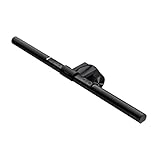
Lighting also breaks once you're standing and moving instead of sitting still — your monitor's relationship to the room light shifts, and overhead office lighting alone tends to wash out a screen or throw glare depending on the time of day. A monitor-mounted light bar solves this without adding another lamp to an already-crowded desk.
Cables are the last piece, and the one people don't think about until they've nearly tripped over one. A walking pad adds motion to a desk setup that used to be completely static, so any cord draped near the belt is now a real hazard, not just clutter. Route charging cables up and away from the walking area, and keep your phone and charging brick on the desk itself.
Space, storage, and the safety realities nobody puts in the marketing photos
Most walking pads run 55 to 62 inches long and 20 to 28 inches wide, plus another foot or two of clearance on either side and behind it so a normal stride doesn't clip the edge. That's a bigger footprint than the sleek product photos suggest — measure your actual floor space before ordering, because a lot of returns in this category are simply "it didn't fit where I planned to put it," not a defect with the product.
Storage is the other half of the pitch, and it's mostly true: most fold flat to 4 to 6 inches and come with small wheels, so sliding one under a bed frame or standing it against a closet wall is realistic for most homes. The catch is weight — a lot of units run 45 to 65 pounds, manageable to slide but not something to lift onto a shelf solo on a bad back day. Buy one you can realistically move yourself.
On safety: these are low-speed machines, but still a moving belt near a power cord. Keep the safety clip attached to your clothing if yours comes with one — it kills the belt instantly if you stumble. Don't run it in socks near the edges; slipping off the side of a moving belt is the most common walking pad injury, and it's entirely avoidable with shoes or grippy socks. And leave the cord enough slack that a step backward doesn't yank the plug.
What to skip
Skip anything under $200 with no continuous horsepower rating listed at all — if a listing only advertises "2.5 HP" with no clarification, assume that's peak horsepower and the real sustained number is lower. Skip fixed, non-adjustable belt tension; you will not be able to fix the slap-and-slip problem once it starts, and it always starts. Skip anything marketed primarily on app gamification rather than the hardware — a great app on top of a mediocre belt is still a mediocre belt in six months. And skip the temptation to buy the cheapest option "just to try it out": the $150 version and the $350 version are not the same product at a different price, the cheap ones are a genuinely different, worse machine.
One more: check the manufacturer's guidance before running one on thick carpet, which can restrict airflow to the motor and cause overheating, and sometimes voids the warranty. A thin rug or hard flooring is the safer bet.
The rest of the setup: hydration, tracking, and staying on calls without sounding out of breath
A few small things make the difference between a walking pad that gets used daily and one that quietly stops. Water matters more than people expect — walking for two or three hours across a workday adds up to real hydration needs, and a large tumbler on the desk removes the "I'll get water later" excuse that ends most habits early. Step tracking matters too, mostly for the feedback loop: seeing 6,000 extra steps land on a screen at day's end is a better motivator than vague intentions, and most phones or wearables handle this without a dedicated device.
And if your job involves regular calls, the pace that keeps you from sounding winded is lower than you'd guess — most people can hold a natural speaking voice up to about 1.5 to 2 mph, but push past that and your breathing changes enough that the other person will notice. Save the faster pace for solo focus work, and drop to a slow stroll the moment you're talking.
So which walking pad should you actually buy?
We're intentionally not locking in a single specific model here: this is a category that turns over fast. Motors get revised, belts get re-sourced, a "2026 model" quietly swaps a part that changes the noise profile, and last year's best pick can become this year's return-rate problem within a few production runs. Use the specs above as your filter and shop the current lineup directly — continuous horsepower of 2.0+ (not peak), adjustable belt tension, a noise rating in the 45 to 50 decibel range, and recent reviews that specifically mention quiet operation on calls. That combination, more than any single brand name, separates the ones that last from the ones that end up on Marketplace by spring.
Frequently asked questions
Do I need a standing desk to use a walking pad?
Not strictly, but it makes a real difference. A fixed-height desk set for sitting will be too low once you're standing and walking, forcing a hunched posture. A height-adjustable desk lets you raise the surface to account for the pad's thickness, which is the setup most owners eventually build toward.
How fast should I actually walk on one during work?
For typing-heavy work, 1 to 1.5 mph is the realistic range most people can sustain without a spike in typos. For reading or calls, 2 to 2.5 mph works for a lot of people. Past that, most need to actively concentrate on the walking itself, which defeats the purpose during work hours.
Are walking pads actually quiet enough for video calls?
Good ones are, generally landing around 45 to 50 decibels at a normal pace — quiet enough that a decent microphone won't pick it up clearly. Cheap, thin-belt units run louder from day one and get louder as the belt wears, to the point owners stop using them during calls entirely. Read recent reviews specifically for call-noise complaints before buying.
How much floor space does a walking pad actually need?
Most units run roughly 55 to 62 inches long and 20 to 28 inches wide, plus another foot or two of clearance on the sides and behind so a normal stride doesn't clip an edge. Measure your actual space before ordering — this is one of the most common reasons people return one.
Can a walking pad replace a real cardio workout?
No, and it's not trying to. The low top speed (usually 3.5 to 4 mph) and lack of incline mean it's built for background movement during the workday, not a training stimulus — a tool for reducing sedentary time, not a substitute for a run or a dedicated workout.
Is it safe to walk on one in socks?
Not recommended, especially near the belt's edges on hardwood or tile underneath. Slipping off the side of a moving belt is the most common walking pad injury, and it's avoidable with shoes or grippy socks. If your unit came with a safety clip, wear it every session.
Do walking pads work on carpet?
Check the manufacturer's guidance first — thick carpet can restrict airflow to the motor and cause it to run hotter than intended, and some warranties exclude carpet use specifically. A thin rug or hard flooring under the unit is the safer default.