Yes, coupon codes still work, and plenty of online checkouts still have a live one sitting there waiting for somebody to try it. The reason it feels like they've stopped working is that the old method, hunting through coupon sites and pasting in code after code, got slow and unreliable enough that most of us gave up. The codes didn't die. The hunt did.
Here is the practical version of the whole article: the "Enter promo code" box is still worth your ten seconds, but you should stop doing the trying by hand. A free browser extension can test codes for you at checkout, compare the price at other stores while you browse, and keep an eye on things you're waiting to buy. We'll get to which one we use in a moment, then walk through where codes still hit, where they never will, and what to skip.
Let the extension do the code-testing
Capital One Shopping is a free browser extension that tests available coupon codes at checkout, compares prices across other retailers while you browse, and tracks items on a watchlist. No Capital One card needed, and it takes about a minute to add.
Add Capital One Shopping free →Why it feels like codes stopped working
Everyone has the same memory: the checkout page, the little promo box, a quick search for "[store] coupon code," and then six minutes of pasting expired codes into a field that says "invalid" every time. Do that twice and you stop doing it. That is a perfectly rational response, and it is exactly why the box has quietly become one of the most ignored parts of online shopping.
Three things made it worse. First, a lot of coupon sites are built to rank in search, not to be correct, so they list codes that expired months ago and call them "verified." Second, retailers got smarter about the box. Many now hide discounts behind email signups, app downloads, or first-order offers, so the code you need isn't on any list. Third, the stacking rules got strict. Plenty of stores allow exactly one code per order, which means a bad guess can lock out a good one.
None of that means discounts are gone. It means the manual process has a terrible hit rate for the effort. The fix is to make the process nearly free, which is something software is genuinely good at.
Where codes still hit, and where they don't
Not every store is worth a code attempt. After a lot of checkouts, a rough sorting:
- Worth trying every time: mid-size online retailers, clothing and home brands, beauty and personal-care sites, pet supply stores, and anyone running a loud "SALE" banner. These businesses run promotions constantly, and many leave a code live for returning shoppers or newsletter subscribers.
- Hit or miss: big-box retailers and marketplaces. Codes exist but are often limited to specific categories, specific brands, or specific days.
- Rarely worth the effort: brands that don't discount as a matter of identity. Premium electronics makers, some luxury labels, and direct-to-consumer companies built on one price. If a store has never run a sale, a code won't conjure one.
- Different problem entirely: subscriptions and services. Those usually offer a first-month or annual-plan deal on the pricing page itself, not in a coupon box.
The point of sorting is to save you from guessing. Anything in the first bucket deserves a try, and the cost of trying should be close to zero.
The no-effort way to test codes
This is where a coupon extension earns its spot on the browser toolbar. At checkout, it checks the codes it knows for that store, applies them one after another, and keeps whichever one gives the best price. If nothing works, you're out a few seconds, not a few minutes. It also never gets bored, which is the real advantage over you.
We use Capital One Shopping for this, and we've written a fuller breakdown in our Capital One Shopping review. The short version is that it does the code testing automatically, and it does two other things that matter just as much if you're trying to pay less:
- Price comparison. While you browse a product, it checks whether other retailers are selling the same item for less. A coupon on a high price can still lose to a lower price with no coupon, and it's the only way to see that without opening eight tabs.
- Watchlist. Add something you're not ready to buy and it keeps tabs on the price, so you can wait for a genuine drop instead of trusting a banner.
- It's free. There is no premium tier to stumble into, and you don't need to be a Capital One customer to use it.
One honest caveat: like every shopping extension, it needs permission to see what you're browsing on retail sites to do its job. If that bothers you on principle, this whole category of tool probably isn't for you, and doing it by hand is still an option. For most people, the trade is fine.
Compare the price first, then try the code
The most common coupon mistake isn't using the wrong code. It's using a code at the wrong store. Saving something off a price that was already higher than a competitor's is not a win. So the order we use goes: compare, then code.
Generic, widely sold items are where this matters most, the kind of thing where the identical product is on sale at many stores. A small kitchen appliance is a good example, since the same model gets sold by lots of retailers and the prices drift apart more than you'd think. Something like the Instant Pot Duo is exactly the sort of product to price-check before you commit.

For this kind of purchase the workflow is simple. Open the product page with the extension on, see whether another store beats the price, then head to checkout at the cheapest one and let the code test run. You've covered both levers without any extra browsing.
For big purchases, use the watchlist instead of a code
Codes are best for everyday orders. When the item is expensive and you're not in a hurry, a different habit does more: put it on a watchlist and wait. Big-ticket things like headphones, appliances, and screens move in price a lot over a few months, and the retail calendar is full of "sales" that are barely sales.
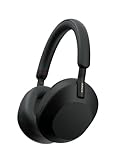
Our rule of thumb is that anything over about $100 gets watched for at least a week before we buy. You learn the item's normal price, so you can tell a real discount from a banner. The Sony WH-1000XM5 headphones are a good example of a product people watch for a long time before buying, and they're the kind of purchase where patience pays.
If you want the longer treatment on timing a purchase around the November sales, see how the same logic plays out in our price-checking guide. The idea is the same: gather information while you're not under pressure, and buy when the number is actually good.
What to skip
Skip the "free coupon code" search pages. Most are ad-stuffed and out of date. If you're going to look for a code, look somewhere the store itself publishes it, like its email signup, its app, or a banner on its own site.
Skip stacking multiple extensions. Running two or three coupon tools at once means they fight over the checkout box and can overwrite each other. Pick one.
Skip codes sent by strangers. A "code" from a random message or an unfamiliar site can be a phishing attempt dressed up as a deal. A real code is typed into the store's own checkout, never into a page that asks for your card or login first.
Skip buying something just to hit a minimum. A code that needs a larger cart than you planned is a way to spend more, not less.
Skip assuming the first discount is the best. A site may auto-apply a modest offer while a better code sits unused. Test the box anyway, and compare against other stores before you pay.
The 30-second routine
Put together, the habit is short enough to do on every order that matters. Install the free extension once. On any product page, glance at the price comparison. Add anything expensive to the watchlist and wait a week. At checkout, let the code test run, then pay. That's the entire system, and almost none of it requires you to think.
Try the checkout box again, without the work
The free Capital One Shopping extension tests coupon codes for you, compares prices across other retailers, and keeps a watchlist of what you're waiting to buy. Add it once and it runs in the background on every shop.
Add the free extension →Frequently asked questions
Do coupon codes still work in 2026?
Yes. Many online stores still honor promo codes at checkout, especially mid-size retailers, clothing and home brands, and beauty and pet sites. What has changed is that the codes are harder to find by hand, since many coupon lists are out of date and some stores hide offers behind email signups or apps.
How can I find working coupon codes without searching?
A free browser extension that tests codes at checkout is the lowest-effort route. Capital One Shopping, for example, applies available codes for you and keeps the one that gives the best price, so you aren't pasting expired codes yourself.
Is Capital One Shopping free?
Yes. The extension is free to use and you don't need to be a Capital One customer or have a Capital One card. It also compares prices across retailers and offers a watchlist for items you're waiting to buy.
Why does my promo code say invalid?
Common reasons: the code expired, it's limited to certain products or a first order, it can't be combined with another offer, or your cart doesn't meet a minimum. Try a different code, or check the store's own email signup or app for a current offer.
Can I use more than one coupon code on an order?
At many stores, no. A lot of retailers allow one promo code per order. If a store does allow stacking, the terms will usually say so at checkout. Using an extension that tests codes one by one helps you find the best single code.
Is it safe to use a coupon extension?
Coupon and price-comparison extensions need permission to view your browsing on shopping sites so they can work. Read what an extension asks for before installing, stick to ones from a company you recognize, and keep to one coupon extension at a time.
Should I use a coupon code or wait for a sale?
Do both when you can. For everyday orders, a code at checkout is a quick win. For bigger purchases, put the item on a watchlist for a week or more, learn its usual price, and buy when a real drop shows up.