A smart plug is one of the least exciting purchases you can make and also one of the only pieces of tech that pays for itself in the first month you own it. It's a $12–$25 plastic box that sits between your outlet and whatever you plug into it, and it turns that thing — a lamp, a coffee maker, a string of patio lights — into something schedulable, voice-controllable, and occasionally a little bit magic. The mistake almost everyone makes is buying eight of them, setting up nothing, and letting them sit in a drawer with the HDMI cables you're never going to use again. The move is buying two or three and setting up the handful of automations that actually change your day.
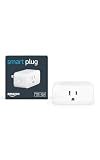
- Top pickKasa Smart Plug Mini, 4-Pack~$28
- Best budgetKasa Smart Plug with Energy Monitoring~$20
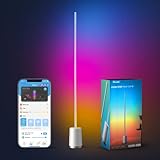
- Worth the splurgeGovee Corner Floor Lamp RGB~$40
What a smart plug actually does (and the setup step people skip)
Strip away the marketing and a smart plug does exactly one thing: it lets an app, a voice assistant, or a schedule flip an outlet on and off. That's it. Everything else — the "scenes," the geofencing, the voice routines — is just different ways of triggering that one on/off switch. Which means the plug itself matters less than people think. What matters is picking one that connects reliably to your WiFi, doesn't need a separate hub, and works with whatever voice assistant you already have plugged into your life.
The step people skip: naming the plug something specific during setup, not "Plug 1" or whatever the app defaults to. "Living room lamp" versus "Plug 1" is the difference between an automation you'll actually use and one you'll forget exists in a month. Spend the extra ten seconds.
For most households, a basic WiFi plug with no hub requirement is the right starting point. Buy a multipack rather than one at a time — you'll find a second and third use for them faster than you expect.
Automations #1 and #2: the lamp and the coffee maker, done right
These are the two everyone sets up first, and they're also the two most people set up badly. A lamp on a smart plug should not just turn on at a fixed time — 7pm in December and 7pm in June are very different amounts of daylight. The better version uses your app's sunset/sunrise setting instead of a clock time, so your living room lamp clicks on at actual dusk year-round without you touching the schedule again. It's a small thing that makes the automation feel like it's paying attention instead of just following a dumb timer.
The coffee maker automation has a real gotcha that trips people up: it only works cleanly on machines with a physical switch that stays in the "on" position, like most basic drip machines. You fill the reservoir and basket the night before, leave the machine's own switch flipped to on, and let the smart plug be the thing that actually supplies power in the morning. If your machine requires you to press a button to start brewing — most single-serve pod machines, some higher-end drip makers — cutting power and restoring it won't start a brew cycle, it'll just power the machine back on and wait for you. Check this before you build your whole morning routine around it, or you'll be very confused on day one.
Done right, this is the automation people talk about the most, because there's something disproportionately satisfying about walking into a kitchen that already smells like coffee.
Automation #3: an away mode that isn't just leaving one lamp on
The classic "leave a light on when you travel" trick fools nobody past age twelve, and a single lamp that's always on at the same brightness from the same window is arguably a bigger tell than a fully dark house. A real away-mode automation staggers two or three plugs — a lamp, a TV or radio on a plug, maybe a porch light — turning on and off at slightly randomized times across the evening, mimicking the on-again-off-again pattern of someone actually moving through a house. Most smart plug apps have a built-in "vacation mode" or "away mode" toggle that does exactly this without you scripting anything.
If you're on Apple devices and want this to live inside the Home app alongside HomeKit accessories instead of a separate app, a HomeKit-compatible plug is worth the small price premium. Wemo's mini plug works with Apple Home, Alexa, and Google Assistant, so you're not locked into one ecosystem if your household is a mixed-phone situation.
Automation #4: string lights that turn themselves on at dusk
This is the automation with the best effort-to-payoff ratio on this whole list. Patio string lights, porch lights, a lit-up tree in the front yard for the holidays — all of it depends entirely on someone remembering to flip a switch at the right time, and someone always forgets, usually right when you have people over. An outdoor-rated smart plug on a dusk-to-dawn or sunset schedule solves this permanently. You set it up once in October and don't think about it again until you unplug the lights in January.
The one non-negotiable here: use an actual outdoor-rated plug, not an indoor one in a plastic bag or under a flowerpot. Outdoor smart plugs are weather-sealed, usually rated IP64 or better, and built to handle rain and temperature swings without shorting out. They typically have two independently controllable outlets too, which is genuinely useful — string lights on one schedule, a motion-triggered spotlight on the other.
Automation #5: aquariums, pet feeders, and the stuff you can't afford to forget
This is the category where smart plugs stop being a convenience and start being genuinely important. Aquarium lights need a consistent day/night cycle for fish and plant health — inconsistent lighting stresses fish and encourages algae blooms. A smart plug on a fixed schedule does this more reliably than a human ever will, especially through busy weeks, travel, or just forgetting. Automatic pet feeders that run on a wall outlet rather than batteries benefit the same way: consistent timing matters more than people expect for animals used to a routine, and a battery dying silently overnight is a worse failure mode than most people plan for.
For equipment like aquarium heaters or filter pumps that run continuously, an energy-monitoring smart plug is worth the extra few dollars. It won't fix a failing heater, but a sudden spike or drop in the wattage it's normally pulling is an early warning sign something's wrong — a heater stuck on, a pump losing efficiency — well before you'd notice by eye. That's a genuinely useful early-warning system for equipment you can't watch all day.
What's not worth automating
Not everything belongs on a smart plug, and treating every outlet in your house as a candidate is how you end up with fifteen unused entries in an app you resent opening. Skip smart plugs for anything with its own internal clock or compressor cycle that shouldn't be interrupted arbitrarily — refrigerators, freezers, and most medical equipment should never be on a schedule that could cut power at the wrong moment. Skip them for space heaters and other high-draw appliances unless the plug is explicitly rated for the wattage; most basic smart plugs top out around 15 amps (roughly 1800 watts), and a space heater or hair dryer pushed past that rating is a legitimate fire risk, not a hypothetical one.
Also skip buying a smart plug when a smart bulb already does the job better — for a lamp you're not sharing with anything else on the same outlet, a bulb with built-in scheduling and dimming (like a Govee or similar smart bulb) is simpler than a plug plus a dumb bulb, since you get dimming and color temperature control the plug alone can't offer. And once you've got two or three plugs and a power strip running your evening routine, the tangle of cords behind the console table gets real fast — a basic cable management box keeps it from looking like a server closet.
Frequently asked questions
WiFi, Zigbee, or Matter — which kind of smart plug should I actually buy?
For most households, a plain WiFi smart plug is the right call: it connects directly to your router, needs no separate hub, and works fine for lamps, coffee makers, and outdoor lights. Zigbee plugs need a hub (like a Philips Hue bridge or SmartThings hub) but form a more reliable mesh network if you already have one and own a lot of smart devices. Matter is the newer interoperability standard meant to let WiFi, Zigbee, and other devices all talk to each other and to Alexa, Google Home, and Apple Home without caring who made them. Buying Matter-compatible hardware today is a reasonable way to future-proof a purchase, but a plain WiFi plug is not obsolete and will keep working fine on its own.
Will a smart plug work with Alexa, Google Home, and Apple Home?
Most mainstream smart plugs (Kasa, Amazon's own plug, Wemo) support Alexa and Google Home out of the box. Apple Home (HomeKit) compatibility is less universal — check the box or listing for a HomeKit badge before buying if that's your ecosystem. Wemo's plugs are a safe bet for HomeKit; some Kasa models require a separate HomeKit-compatible hub. If your household mixes phone types, prioritize a plug that explicitly lists all three assistants rather than assuming compatibility.
Are energy-monitoring smart plugs actually worth the extra cost?
For general lamps and string lights, no — you're paying a few extra dollars for data you'll never look at. For anything running continuously and expensively (space heaters, aquarium equipment, a chest freezer on a backup circuit), yes — the historical wattage graph makes it much easier to catch a device that's degrading, stuck on, or drawing more than it should before it becomes a bigger problem or a bigger bill.
Is it safe to put a space heater, hair dryer, or other high-wattage appliance on a smart plug?
Only if the plug is explicitly rated for the appliance's wattage, and even then, treat it cautiously. Most basic smart plugs are rated around 15 amps (about 1800 watts) — check both the plug's rating and the appliance's actual draw before combining them, and never leave a space heater running unattended on any kind of automated schedule. When in doubt, don't put high-heat appliances on a smart plug at all; the convenience isn't worth the risk.
Do smart plugs still work if the internet or WiFi goes down?
The physical on/off switching still works locally in most cases, and any schedule already saved to the plug's onboard memory generally keeps running. What stops working is anything that requires the app or a voice assistant in real time — turning a plug on remotely, checking status from your phone, or voice commands, since those need an internet connection to reach the plug through the manufacturer's servers.
How many smart plugs can I realistically run on one home WiFi network?
Most home routers handle 30–50 smart home devices without issue, and a handful of smart plugs won't meaningfully strain a modern router. If you're scaling up toward whole-house automation with dozens of devices, a mesh WiFi system or a dedicated Zigbee/Matter hub will keep things more stable than adding endless devices directly to your main WiFi network.