Every trip has one bag that never gets checked, never gets left in the overhead bin two rows back, and never leaves your side through security, a layover, or a red-eye: the tech pouch. It's the smallest bag you pack and somehow the one most likely to make or break a trip. Dead phone at the gate. Tangled cable ball at the bottom of a backpack. A power bank you swear you packed but is actually still charging on your kitchen counter. None of that is a packing failure exactly — it's a system failure, because most people treat "tech stuff" as loose items instead of one deliberate, prioritized loadout.
- Top pickBagsmart Toiletry & Travel Organizer~$25
- Worth the splurgeAnker 737 PowerCore 24K~$130
This isn't a "50 gadgets for the ultimate traveler" list. It's the opposite: a short, ranked, actually-carry-this loadout for one pouch, built around what you use constantly — charging, listening, finding — rather than what looks good in a flat-lay photo. If you've ever stood at TSA digging through a backpack pocket while a line builds behind you, or unzipped a supposedly "organized" pouch mid-flight only to find three cables knotted into one, this is the fix.
Why one small pouch beats a tangled backpack pocket
The backpack pocket system fails for a boring, structural reason: it has no order. Cables migrate to the bottom. The power bank ends up wedged under a jacket. Earbuds fall into the crack between a water bottle and a laptop sleeve. Every item is individually fine — it's the lack of a fixed home for each one that turns "grab my charger" into a two-minute excavation, every single time, for the whole trip.
A dedicated pouch solves this the same way a junk drawer organizer solves a junk drawer: not by owning less stuff, but by giving every item exactly one place it lives. Pull the pouch out at security, everything's visible in one zip-open motion, put it back, done. The goal isn't minimalism for its own sake — it's friction removal. You want your hand to land on the right cable without looking, in a dim hotel room, half-asleep, before an early flight.
The other reason this matters more than it seems: tech pouches are the thing you reach for daily on a trip, not once per suitcase. Your charger, earbuds, and power bank get touched multiple times before 10am. A system that works fast when you're groggy is worth more than one that just looks tidy in a packing video.
The prioritized loadout: what actually goes in, in order
Before the specific product picks, here's the order of operations — what earns a spot in the pouch first, what's optional, and what doesn't belong at all. Pack top to bottom and you won't overthink it.
| Priority | Item | Why it's non-negotiable |
|---|---|---|
| 1 — Must-have | Phone + laptop charging cables | A dead phone at a gate is the single most common travel-tech failure |
| 2 — Must-have | Power bank | Airport outlets are never where you're sitting; a bank keeps you charging while you move |
| 3 — Must-have | Earbuds + case | Flights, layovers, and hotel gyms are all more bearable with real noise control |
| 4 — Highly recommended | Wall adapter / multi-port plug | Hotel rooms rarely have enough outlets near the bed or desk |
| 5 — Highly recommended | Bluetooth tracker | Clipped to the pouch itself, so a lost pouch is a findable pouch |
| 6 — Nice to have | SD card reader / small adapter | Only if you actually shoot photos or video on the trip |
| 7 — Skip | A second full charger, spare cables "just in case," backup earbuds | Redundancy for its own sake is exactly what makes the pouch stop closing |
That's it. Five things you actually need, one thing that's situational, and a clear line under what to leave home. Now let's get into what to actually buy for each.
The core three: the pouch, the power, and the sound
Start with the container, because the wrong pouch undermines everything you put in it. You want mesh pockets you can see into at a glance, an elastic loop or two for cables so they don't turn into spaghetti, and a shape that survives being crammed into the top of a carry-on. A lot of people reach for a dedicated "tech organizer," but a well-built toiletry-style pouch with the right compartments does the job just as well — often better, since toiletry bags are built to survive actual travel abuse, not just look nice on a shelf.
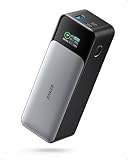
Next: the power bank, and this is the one item worth spending real money on. A cheap bank either doesn't hold a charge after six months or charges so slowly it's useless between a 40-minute layover and your next gate. The Anker 737 is the one to buy if you want to stop thinking about this problem entirely — enough capacity to fully charge a phone five-plus times or top off a laptop in a pinch, fast enough charging that ten minutes at an outlet buys real battery back, and a small screen that tells you exactly how much juice is left instead of a vague four-dot guess.
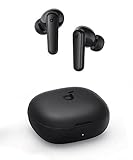
Third: earbuds, and specifically earbuds with real active noise cancellation, not just noise "reduction" that barely dulls a jet engine. This is less about music and more about sanity — a crying toddler three rows back, a gate agent's PA system, the dull roar of a full cabin. The Soundcore P3i earns its spot here because it does the noise-cancellation job well at a price that doesn't make you panic if it goes missing in a seat-back pocket, which, statistically, happens to someone on every full flight.
Those three — pouch, power bank, earbuds — are the whole foundation. Everything else in this article is refinement.
The tracker: so the pouch itself never goes missing
Here's the failure mode nobody plans for: the pouch survives the whole trip perfectly organized and then gets left in a seat-back pocket, a hotel nightstand drawer, or a rideshare. A tracker clipped to the pouch's zipper pull turns "it's gone forever" into "it's three gate agents away, let me go get it."
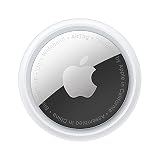
If you're in the Apple ecosystem, an AirTag is the obvious call — it rides on the same Find My network your phone already uses, which is enormous, and Precision Finding walks you literally to the seat cushion it's wedged under. Buying the 4-pack instead of a single tag is the better move even if you only need one right now: one goes on the tech pouch, one on your main bag, one on a laptop sleeve, and you've got a spare for the next thing you inevitably misplace.
If you're on Android, or you'd rather not lock into Apple's ecosystem, the Tile Mate does the same job at a lower per-unit price and works across both platforms. The tradeoff is a smaller, less dense finding network — great in cities and airports where other Tile users are common, less useful in a rural rental car lot at midnight. Either tracker beats the alternative, which is no tracker at all and a genuine gamble every time the pouch leaves your hand.

The system around the pouch: cables at home, cubes on the road
A pouch that's organized on day one of a trip and a tangled mess by day one of the next trip isn't actually solved — it's just been postponed. The real fix happens at home, between trips, not mid-flight. Keep a dedicated charging station where cables live permanently, so packing the pouch becomes a five-minute transfer instead of a hunt through three different drawers. A cable management box on your desk or entertainment console does exactly this for your everyday cords, and the same instinct — give every cable one fixed home — is precisely what makes a travel pouch work in the first place. Get good at it at home and packing the pouch stops being a chore every single time.
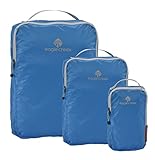
On the road, the pouch needs a home inside your bag too, not just inside itself. The move that separates people who repack calmly at each stop from people digging through a duffel at 5am: dedicated packing cubes, with the tech pouch always going in the same cube, in the same spot, every single time. It sounds almost too simple to matter, and that's exactly why it works — muscle memory does the organizing for you after the second or third trip.
What to leave out — because more stuff isn't more prepared
The instinct when packing tech is to over-pack "just in case." A second full-size charger. A backup power bank. Three sets of earbuds because you're not sure which ones you'll want. Every one of these feels like insurance and functions like dead weight — the pouch stops zipping easily, you stop being able to see what's actually in there, and ironically you become more likely to lose track of something specific because there's too much to scan through when you need it fast.
The better version of "just in case" is buying genuinely reliable gear once — a power bank that actually holds its rated capacity, earbuds with a case that actually seals, cables that don't fray at the connector after two months — so you don't feel the pull to double up. Redundancy is usually a symptom of not trusting your gear. Fix the gear, not the count.
One more thing worth dropping: a full-size laptop charger brick, if you're already carrying a strong enough power bank and a USB-C laptop. A lot of modern laptops charge fine off a good power bank, which means the bulkiest single item in most tech pouches — the laptop brick — can sometimes just stay home. Check your laptop's charging wattage before you decide, but it's worth five minutes of research to shave real bulk off the pouch you'll be living out of for the next week.
What size pouch should I actually buy?
Small enough to fit in a jacket pocket or the top of a carry-on without shifting things around, big enough to hold a power bank, two cables, earbuds case, and a wall adapter without forcing the zipper. Most travelers land on something roughly 8x5x3 inches. If you're eyeing a specific bag and can't decide, size down — an over-large pouch just invites you to fill it with things you don't need.
Do I really need a dedicated power bank if my phone already lasts all day?
Yes, because travel days aren't normal days. Maps running constantly, photos, boarding passes on screen, a flight delay that turns into three extra hours of scrolling — travel drains a phone battery much faster than a regular workday. A power bank is the difference between panicking at 20% in an unfamiliar city and not thinking about it at all.
AirTag or Tile — which tracker should I actually buy?
If you have an iPhone, get the AirTag; Apple's Find My network is larger and denser almost everywhere, and Precision Finding is genuinely more accurate than Tile's equivalent. If you're on Android, or you want one tracker that works no matter who in your household has which phone, the Tile Mate is the better fit. Both are inexpensive enough that the "right" answer mostly comes down to which ecosystem you're already in.
Should the tech pouch go in a carry-on or a personal item?
Personal item, always, if you're checking a bag or gate-checking anything. The tech pouch holds the stuff you need mid-flight and immediately after landing — power bank, earbuds, charging cable for your phone. If it's buried in checked luggage or an overhead bin two rows away, you've defeated the entire point of having a dedicated pouch.
Is it overkill to put a tracker on a bag you're already carrying with you at all times?
Not really — "carrying it at all times" is exactly when things get left behind: a seat-back pocket, a cafe table, a rideshare seat, a hotel gym locker. The moments a pouch goes missing are almost always moments you briefly set it down and walked away distracted. A $25 tracker covers exactly that gap.
What's the single biggest mistake people make with their travel tech pouch?
Treating it as a junk drawer instead of a system. The pouch works when every item has one fixed spot and you resist the urge to add "just in case" extras. The moment it becomes a catch-all for loose cables and mystery adapters, you're back to digging through a bag at security — just a smaller bag.