Most built-in laptop webcams produce video that looks like it was shot through wax paper in a parking garage. The image is grainy, the colors are muddy, and any backlight — a window behind you, a lamp to the side — turns your face into a silhouette. It doesn't matter how good your slides are if you look like you're calling from a witness protection program. The good news is that a dedicated webcam for $70 to $130 fixes almost all of this, and once you make the switch, you'll wonder how you put up with it for so long.
This guide covers the actual options worth buying in 2026, the 1080p vs 4K debate (the answer might surprise you), why lighting matters more than any camera spec, and — critically — what to skip entirely.
The Logitech C920s: the baseline everything else is measured against
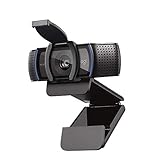
If you've read any webcam roundup in the past five years, you've seen the Logitech C920 or its variants at the top. There's a reason. The C920s (the "s" adds a physical privacy shutter, which matters) shoots 1080p at 30fps, has a glass lens instead of the plastic ones on cheap cameras, handles low-light reasonably well, and works without drivers on Windows, Mac, and ChromeOS. It just works. It ships today, it's on almost every desk at every tech company in the world, and it costs about $70.
The image from a C920s isn't cinematic — it has some compression artifacts in motion, and if your room is very dark it will struggle. But in normal office or home lighting, the jump from your built-in laptop webcam is enormous. This is the camera that turns "sorry, I can barely see you" into "great, you look fine." That's the win.
The 1080p vs 4K debate — and why 1080p usually wins
Here is the thing about 4K webcams: almost no video call platform actually transmits 4K video. Zoom, Teams, Google Meet, and Slack all cap their video streams — typically at 720p for standard video and 1080p for HD, depending on your subscription tier and connection quality. A 4K webcam on a Zoom call is like buying a Ferrari to sit in school-zone traffic. The extra resolution gets compressed into oblivion before it reaches anyone's screen.
Where 4K webcams do have an advantage: they allow better software cropping and panning (the camera can zoom in digitally without losing resolution), and they often have physically larger sensors that capture more light. But for pure video call quality, a well-implemented 1080p camera with a good lens — like the C920s or the Elgato Facecam — will outperform a cheap 4K camera on any call platform. The number of pixels is less important than what the software does with them.
The only people who genuinely need 4K webcams: streamers who record locally, people doing professional recordings for YouTube or courses, and anyone whose platform actually supports 4K delivery. If you're using Zoom for client calls, buy the best 1080p camera you can and spend the remaining $100 on lighting. You'll look better.
Why lighting matters more than the camera — and what to do about it
This is the part most people skip, and it's where the biggest improvement lives. A $500 camera in bad lighting looks worse than a $70 camera in good lighting. Every webcam on this list struggles with the same situation: strong backlight (a bright window behind you) forces the camera to underexpose your face. Move to fix the backlight first, then buy the camera.
The basics of video call lighting: you want your primary light source in front of your face, not behind it. Natural light from a window you're facing is free and genuinely excellent. If your setup doesn't allow that, a small ring light or a dedicated desk lamp pointed at your face makes a dramatic improvement.
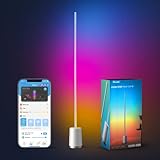
The Govee floor lamp isn't a traditional ring light, but it's an excellent ambient fill option that warms up any space without being blinding. Set it up behind your monitor and it bathes your face in warm, flattering light that any webcam loves. For a more targeted solution, any small ring light positioned at eye level does the same job even more directly.
One more thing about lighting: color temperature matters. Daylight-balanced light (around 5500K, what ring lights typically output) makes skin tones look natural on camera. Yellow incandescent bulbs push everything orange. If you're replacing office bulbs anyway, get daylight-balanced LED bulbs. It's a $12 fix that makes your camera look $100 better.
Alternatives worth considering (and when they make sense)
The Logitech C920s is the right answer for most people, but it's not the only answer. Here are the cases where you might go elsewhere.
The Elgato Facecam is the streaming-focused pick. It has a fixed-focus glass lens (no autofocus hunting), shoots in 1080p/60fps for smooth motion, and gives you manual control over every camera setting through Elgato's Camera Hub software. It's excellent and costs around $100. The tradeoffs: it needs the software to unlock its full potential, and it has no built-in microphone. For pure video calls without a separate mic, the C920s is simpler and cheaper. For hybrid call-plus-recording setups, the Facecam pulls ahead.
The Razer Kiyo Pro has a large adaptive light sensor — the biggest of any webcam in this price range — and outputs 1080p/60fps. It's the pick for people with genuinely dim setups who don't want to invest in separate lighting. At around $100, it makes sense if your room is consistently dark and repositioning isn't an option.
A 4K upgrade worth considering: the Logitech Brio 500 series adds 4K recording capability, a wider field of view, and better autofocus. If you regularly share your screen and want the software zoom capability, these are the logical C920s upgrades at $130–$200. For straight-up video calls, the extra money is hard to justify.
The audio problem: your webcam microphone is not enough
Built-in webcam microphones — including the C920s's dual mics — are decent but not great. They pick up keyboard noise, room echo, and HVAC hum in ways that a closer mic doesn't. If you spend 4+ hours per week on calls, better audio makes you measurably easier to work with. People stop asking you to repeat yourself, which is a small but real quality-of-life improvement for everyone on the call.
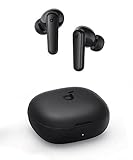
The simplest audio upgrade: wireless earbuds with a built-in mic. Even budget options position the microphone much closer to your mouth than any webcam can. The Soundcore P3i earbuds are the budget recommendation — active noise cancellation, solid call mic, comfortable for long sessions, around $45.
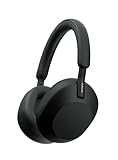
If you're on calls most of the working day and want best-in-class: the Sony WH-1000XM5 headphones remain the reference for remote workers who live in meetings. The ANC is exceptional, the call mic has built-in noise isolation, and over-ear headphones are more comfortable over 8-hour stretches than earbuds. At $398, the price sounds steep until you calculate what you're paying per hour for something you use all day.
What to skip entirely
Any webcam under $30. The lens is plastic, the sensor is tiny, the autofocus hunts constantly, and the color science makes everyone look like they have a low-grade fever. At this price, your laptop's built-in camera is probably comparable. Skip it.
Generic "4K" webcams under $80. Cramming 4K pixels onto a tiny sensor produces worse low-light performance than a good 1080p sensor. The math literally doesn't work. The C920s at $70 beats any no-name 4K webcam at $79 in every real-world test.
Gaming-branded webcams with RGB lighting that aren't from Razer or Elgato. RGB lighting on a webcam is a marketing decision, not an engineering one. The actual lens and sensor in these cameras rarely justify the price. The glow has to come from somewhere in the budget, and that somewhere is usually the optics.
Webcam bundles that include a ring light. Bundle ring lights are almost always underpowered — they're a marketing addition, not a functional one. If you want a ring light that actually works, buy one separately. A 10-inch ring light from any reputable brand runs $25–$40 and is bright enough to genuinely affect your image quality.
The desk setup that makes any webcam look its best
Camera placement gets almost no attention in webcam reviews and it matters enormously. The goal is eye level — a camera looking up at you from laptop-on-a-desk height creates an unflattering angle and usually captures more ceiling than face. Use a monitor stand or arm to bring your screen (and the webcam clipped to it) to eye level. This is a free improvement that's more noticeable than most hardware upgrades.
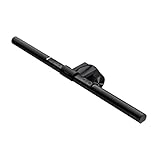
The BenQ ScreenBar is worth a mention for its dual role: it's a monitor-mounted LED lamp designed to light your desk without creating screen glare. In practice, it also lights your face from a flattering angle — directly in front of you, at monitor height. It's a $120 desk lamp that doubles as a call lighting solution, and it's one of the most consistently recommended home office upgrades at any price.
Is the Logitech C920s still worth buying in 2026?
Yes. The C920s has been incrementally updated and remains the strongest value at its price point. There are technically better cameras — the Elgato Facecam and Razer Kiyo Pro both have real advantages — but they cost 30 to 40% more and those advantages show up mainly in streaming or recording scenarios. For everyday Zoom and Teams calls, the C920s is the right answer for most people.
Does a 4K webcam actually look better on Zoom calls?
No, not in a way you or your colleagues will notice. Zoom caps video quality well below 4K for most users. The benefit of a 4K sensor is potential better low-light performance and software-based zoom without resolution loss — not better Zoom call quality. If you're buying purely for video calls, the extra money for 4K is better spent on lighting or audio.
What's the single biggest improvement I can make to how I look on video calls?
Light placement. Make sure your primary light source is in front of your face, not behind it. A window you're facing or a lamp at face level costs nothing to reposition and makes more visible difference than any camera upgrade. After that: camera at eye level. After that: a dedicated webcam. In that order.
Do I need a separate microphone for video calls?
For casual meetings, no — the C920s's built-in mics are adequate. If you're presenting to clients, teaching, recording anything, or on calls more than 4 hours per day, better audio matters more than better video. A pair of wireless earbuds positions the mic close to your mouth and makes the biggest audio quality jump for the least money and hassle.
What's the best webcam for a dark home office?
The Razer Kiyo Pro, which has a large 1/2.8" adaptive light sensor built for low-light environments. That said, a $30 ring light combined with the C920s will usually look better than the Kiyo Pro alone and cost about the same. Fix the lighting problem at the source before spending more on a camera designed to compensate for it.
Will a better webcam improve virtual backgrounds?
Yes — virtual backgrounds and background blur work significantly better with a webcam that has good edge detection and a higher frame rate. The C920s handles standard virtual backgrounds well. For AI-generated background removal, the Elgato Facecam with Camera Hub has better software integration. And a real background that is tidy and intentional will always look more professional than any virtual one, regardless of camera.