Every teacher has been there: you need a ninety-second listening passage at the right reading level, in a voice that isn't yours, by tomorrow morning. The textbook CD is scratchy and ten years old, the audio that came with the curriculum doesn't match your unit, and recording it yourself in an empty classroom after the bell is exactly as fun as it sounds. AI voices now fix this in about five minutes. You write or paste the passage, pick a voice, and download an MP3 that sounds like a real person reading. Here is how to do it well, what to skip, and how to stay inside the free tier while you figure out what you need.
Make your first listening passage free
ElevenLabs has a free tier of about 10,000 characters a month, with no card needed to start. Paste in a paragraph from your next lesson and hear it read back before you decide anything.
Try ElevenLabs free →What this is actually good for in a classroom
Not everything needs audio, so let's be specific. These are the jobs where an AI voice earns its keep.
Read-alouds and model reading. Struggling readers benefit from hearing fluent, expressive reading while they follow the text. A generated recording lets a student replay a passage as many times as they need without tiring out anyone, and it frees you to run a small group while the rest of the class listens independently.
Listening comprehension passages. You control the content, the length, and the difficulty. Need a passage on the water cycle pitched at a fifth-grade level, with two tricky vocabulary words built in? Write it, generate it, done. No hunting for a clip that almost fits.
Language-class dialogues. This is where the tool shines. ElevenLabs supports 70+ languages, so a Spanish teacher can build a cafe conversation, a French teacher can build a train-station announcement, and a German teacher can have two different voices argue politely about weekend plans. Hearing native-sounding pronunciation, at a pace you choose, is worth more than another worksheet.
Accessibility. Students with dyslexia, vision differences, or attention challenges often do better with text and audio together. Turning your handouts and study guides into audio versions is a small effort that makes a real difference for the students who need it, and it helps plenty of other kids too.
The five-minute workflow
The process is the same whether you are making a read-aloud or a dialogue. The shortcuts are in the details.
1. Write the script for ears, not eyes. Short sentences. Spell out numbers and abbreviations you want read a certain way ("Doctor Lee," not "Dr. Lee" if you are unsure). Skip parentheses and footnotes. If you are adapting a text, read it aloud to yourself once; anywhere you stumble, the voice will too.
2. Choose a voice that matches the job. For a young-learner read-aloud, pick something warm and unhurried. For a listening-comprehension test, pick a clear, neutral voice so the challenge is the content and not the accent. For a dialogue, pick two voices that sound distinctly different, because students need to tell the speakers apart by ear alone. Audition three voices on the same fifteen seconds of your actual passage; the right one is usually obvious.
3. Generate in short chunks. One passage, one render. If a name is mispronounced, you re-generate a small piece instead of redoing a whole lesson. For dialogues, render each speaker's lines separately and stitch them together in any free audio editor, or just number the clips and play them in order.
4. Fix pronunciation by respelling. If the voice trips on a vocabulary word or a foreign name, spell it phonetically in the script ("Nye-AG-ah-rah"). It feels silly and it works.
5. Name and file it. Save each clip as "Grade-Unit-Topic" and drop it into your class folder or learning platform. Next year's you will be grateful.
Try a dialogue in your target language
Pick two voices, paste a short exchange, and listen. The free tier is enough to test a full classroom dialogue before you spend anything.
Start free with ElevenLabs →Keep it short: working inside the free tier
The free tier gives you roughly 10,000 characters a month, which works out to around ten minutes of audio. That sounds tight until you notice that good classroom listening passages are short anyway. A comprehension passage is rarely more than 600 to 1,000 characters. A language dialogue runs a few hundred. At those lengths, one month of free credit covers a real stack of materials.
A few habits stretch it further:
- Draft and edit in a doc first. Only paste the final script. Every test render spends characters.
- Audition on a sentence, not a page. Fifteen seconds of text tells you whether the voice fits.
- Reuse. A well-made passage on a timeless topic works for years. Build a small library rather than something new each week.
- Batch in one sitting. Plan the month's passages together, generate them all, and be done.
If you outgrow the free tier, the $5 Starter plan gives you more characters plus a commercial license and instant voice cloning. Teachers who share materials on a store like Teachers Pay Teachers should look at that license before selling anything with AI audio in it, and read the platform's own rules too. For ordinary classroom use, most teachers find the free tier or the entry paid tier plenty.
Read this before you upload anything: policy and student privacy
This is the section to take seriously. Before you use any AI tool with your class, check your school or district's policy on AI tools and approved software. Policies vary widely. Some districts maintain an approved-vendor list, some require sign-off for anything students will interact with, and some are still writing their rules. A quick email to your tech coordinator or administrator saves headaches later.
Then follow one simple rule that holds regardless of policy: never put student names or personal information into any AI tool. That means no names, no grades, no IEP or 504 details, no writing samples that identify a child. You do not need any of that to build listening materials. Use invented characters ("Maria and Tomas at the market") and generic content. If you are making materials for a specific student's accommodation, keep the script about the topic and leave the student's information out of it entirely.
Two more habits are worth adopting. Tell students and families when audio is AI-generated; it is honest, and it opens a good conversation about how these tools work. And listen to every clip all the way through before you share it. Voices are impressive but not perfect, and you are the quality check.
Gear worth buying, and gear to skip
Here is the good news: you need almost no equipment to make these materials. It is text in, MP3 out, in a browser. No microphone, no studio, no software to learn. The only gear that matters is for listening, because you should hear your clips the way students will.
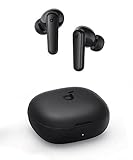
If you are checking audio at a desk, at home, or in a noisy workroom, a decent pair of earbuds is all you need.
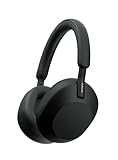
If you do a lot of prep on the commute or in a loud open-plan office, noise cancelling earns its price by letting you hear small pronunciation errors.
What to skip: a dedicated podcasting microphone, an audio interface, or a recording booth. Those are for people recording their own voice. If you are generating the audio, none of it applies. Spend that money on classroom books instead.
Which approach should you use? A quick comparison
AI voices are not the only way to get audio into a lesson. Here is an honest look at the alternatives.
Recording yourself. Free, personal, and great for building connection with young learners. But it takes time, you will redo takes, and you cannot easily give your students a second accent for a dialogue. Keep doing this for the moments where your voice matters.
Publisher audio and found recordings. Convenient when it matches your unit, and often well produced. The catch is fit: it rarely matches your exact vocabulary, level, or timing, and licensing for reuse can be unclear.
Basic built-in text-to-speech. Free and fast, and fine for quick accessibility needs. For language learning, though, flat or robotic pronunciation can teach the wrong rhythm, so it is not our first choice for model audio.
AI voices. The best mix of control and quality for custom material. You decide the words, the speed, and the voice. The tradeoffs are the character budget, the extra proofing step, and the policy homework above.
Our take: use AI voices for custom passages and multi-speaker dialogues, record yourself for community-building moments, and use publisher audio when it fits cleanly.
Build this week's listening passage
Start on the free tier, keep the passage short, and see how it sounds in your classroom before you commit to anything.
Try ElevenLabs free →Frequently asked questions
Is ElevenLabs free for teachers?
There is a free tier of about 10,000 characters per month, which is roughly ten minutes of audio, and you do not need a card to start. Paid plans start at $5 per month. Check the ElevenLabs site for current terms and any education pricing.
How long can a free-tier listening passage be?
That depends on your budget, but most classroom passages are 600 to 1,000 characters, so you can make a good number of them per month. Draft in a document first and only generate the final script to avoid wasting characters.
Can I make dialogues with two different speakers?
Yes. Generate each speaker's lines with a different voice, then play the clips in order or join them in a free audio editor. Pick two voices that sound clearly different so students can tell who is talking by ear.
Does it work for foreign language classes?
ElevenLabs supports 70+ languages, so you can build dialogues and listening passages for most common classroom languages. Always listen through the finished clip, or ask a fluent colleague to check, before using it for assessment.
Is it safe to use with student information?
No student names or personal information should go into any AI tool. Use invented characters and generic content, and check your school or district policy on AI tools before using one with your class.
Can I use the audio in materials I sell?
The free tier is for non-commercial use. The $5 Starter tier and up include a commercial license. Also check the rules of whichever marketplace you sell on, since they may have their own policies on AI-generated content.
Will it help students who struggle with reading?
Hearing text read fluently while following along helps many struggling readers, and audio versions of handouts are a simple accessibility step. Pair it with your usual supports and your school's guidance for individual students.