Somewhere around 2020, laptop stands went from "thing physical therapists nagged about" to "thing in the background of every desk-tour photo." The reason is boring physics: a 13- or 15-inch laptop screen sitting flat on a desk puts the top of the display roughly 6 to 8 inches below eye level for anyone taller than about 5'4". Look down at that angle for eight hours a day for a few years and you get the very specific ache physical therapists now just call "tech neck" — forward head posture, a permanently tight upper trap, a chin that's a few inches ahead of where it should be. A stand raises the screen. That part is real, it works, and it's one of the cheapest ergonomic fixes on this entire website.
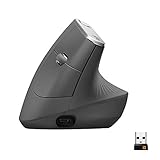
- Top pickLogitech MX Vertical Ergonomic Mouse~$100
- Best budgetVELCRO Brand ONE-WRAP Ties, 8-Inch (25pk)~$10
- Worth the splurgeAnker 737 PowerCore 24K~$130
Here's what nobody selling you a $22 aluminum riser mentions: raising the screen also raises the keyboard, since it's attached to the same slab of metal. So the stand that fixes your neck can, on its own, make your wrists and shoulders worse — which is exactly why a lot of people buy one, use it for three weeks, and quietly go back to hunching. Let's do the whole thing properly.
The monitor-height rule, and why your laptop breaks it by default
Occupational health guidelines for any screen boil down to three numbers: the top of the display at or just slightly below eye level, the screen 20 to 28 inches away (roughly an arm's length), and a viewing angle of 10 to 20 degrees down, not straight ahead and definitely not down at 40. It's the same rule for a 27-inch monitor or a 13-inch MacBook. The difference is that a monitor arrives on a stand that's already close to correct. A laptop arrives flat on a table, which is the ergonomic equivalent of reading a book lying flat on the desk in front of you.
The often-cited spine-load research from Dr. Kenneth Hansraj puts numbers on this: at a neutral tilt, your head weighs about 10 to 12 pounds and your neck muscles support exactly that. Tilt your head forward 15 degrees and the effective load on your cervical spine jumps to around 27 pounds; at 45 degrees — roughly what you're doing on a laptop propped on your lap — it's closer to 49 pounds. A stand that lifts your screen those missing 6 to 8 inches is closing a gap that's putting real, compounding load on your neck every single day.
A stand alone will not fix your posture — and this is the part everyone skips
Raise your laptop on a stand without anything else and you've traded one problem for a worse one: your keyboard and trackpad are now floating 4 to 6 inches above the desk, at shoulder height, forcing your arms up and out like you're perpetually reaching for a high shelf. Do that for a full workday and you'll trade neck pain for shoulder and wrist pain within a couple of weeks — which is exactly why so many laptop stands end up in a closet with one bad review titled "gave up." A stand is only step one. Step two, non-negotiable, is a separate external keyboard and mouse that sit at proper elbow height on the desk itself, while the laptop screen floats up where your eyes actually need it.
Once you've split the screen from the input devices, the mouse itself is worth a second look. A flat mouse held for eight hours forces your forearm into full pronation — the same twisted position as pouring a pitcher, held constantly. The Logitech MX Vertical rotates your hand into a natural handshake angle instead, which is a real, well-documented reduction in forearm strain, not a gimmick.
Whatever keyboard and mouse you land on, your wrists still need somewhere to rest between keystrokes that isn't the sharp edge of the desk. A cheap foam wrist rest pair solves this for less than a coffee run and takes thirty seconds to put in place.
Fixed height vs. adjustable: what's actually worth paying for
Laptop stands split into two honest categories. Fixed-height stands are a single molded piece of aluminum or bamboo, usually $15 to $30, with no moving parts to fail — you either fit their one angle or you don't. Adjustable stands add a hinge or telescoping arm so you can dial in height and angle, usually $30 to $80, and they're worth the extra cost if you're taller than average, share a desk, or switch between sitting and standing. More moving parts also means more that can eventually loosen or wobble, so buy adjustable because you need it, not because it sounds more premium.
Material matters more than brand name. Solid aluminum stands are heavier, more stable, and dissipate heat from the laptop's underside better than plastic — a real secondary benefit, not marketing filler. Lifting a laptop off a sealed desk surface opens airflow to the bottom vents, and several thermal reviews of ultrabooks have linked this to less fan noise and less CPU throttling under load.
The other spec worth checking: weight rating. A 13-inch MacBook Air is under 3 pounds and sits happily on almost any stand made. A 16-inch loaded gaming laptop can push past 6 pounds, and the cheapest single-hinge folding stands aren't rated for that — the hinge creeps loose within a couple of months and the whole thing leans forward under the weight. Check the spec, not just the star rating.
Desk stand vs. portable stand: pick your lane
A permanent desk setup wants a heavier, more rigid stand that never needs to fold — it sits in one place, holds its angle under real weight, and you stop thinking about it. A stand headed to a coffee shop or a hybrid office wants the opposite: lightweight, foldable, small enough to disappear into a bag. Buying the wrong category for your actual habits is the most common laptop-stand regret — the rigid block nobody carries anywhere, or the featherweight fold-up on a desk that never moves, wondering why it feels flimsy.
If you're the one actually carrying a stand around, the bag matters as much as the stand. A laptop compartment with real padding is the difference between a combo that survives a commute and one that arrives with a cracked hinge.

And if part of the appeal of a portable stand is working from places without a reliable outlet nearby, a real power bank is what actually makes that sustainable — a coffee shop with one open plug near the register is not a plan.

The rest of the kit: what actually makes a raised laptop functional
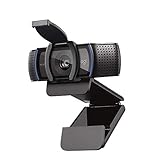
Once your screen is floating at the right height, two small annoyances show up immediately. First, your laptop's built-in webcam — which used to point roughly at your face when the laptop sat flat — now points straight up your nose or at the ceiling, because it's mounted 6 inches higher and tilted back. A cheap external webcam clipped to the top of the stand or an external monitor fixes this in about ninety seconds and looks dramatically better on every call.
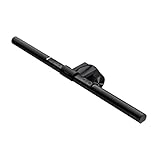
Second, once you're using an external keyboard, mouse, and webcam alongside a stand, your desk has quietly gone from one cable (the charger) to four or five. A basic monitor light bar helps here too, in an indirect way — with the screen elevated and angled back, overhead light creates more glare than it used to, and a light that clips to the top of the display and shines down onto the desk instead of at your eyes solves it without adding another lamp base to the clutter.
For the actual cable tangle, a simple box and a stack of reusable ties handle 90% of it. The box swallows the power strip and the excess slack; the ties keep the keyboard, mouse, and webcam cords from turning into a nest under the stand.

What to skip (and the cheap way to test this before you buy anything)
Before spending a dollar, you can prototype the actual height change with something you probably already have. A stack of hardcover books under a laptop, or a set of furniture risers under the desk itself, will tell you within a week whether raised-screen ergonomics genuinely help your specific neck, before you commit to buying and mounting a real stand. It's inelegant and not something to live with long-term, but as a $0-to-$20 experiment it's honest and it works.

Once you've confirmed the height change helps, skip these when you go shopping for real: single-hinge folding stands with no weight rating listed anywhere in the description (the hinge is the first thing to fail, and if they won't tell you the rating, it's because it's bad). Stands with a built-in fan or RGB lighting bolted on — neither does anything for your neck, both add a USB cable you now have to manage, and both are usually a sign the company is trying to distract from a mediocre core design. And anything advertised primarily by how far it folds flat rather than how sturdy it is under actual weight — foldability and rigidity are almost always a tradeoff, and for a desk stand, rigidity should win every time.
Frequently asked questions
What is the "monitor height rule" everyone talks about?
Top of the screen at or just below eye level, the display 20 to 28 inches away, and a viewing angle of 10 to 20 degrees down rather than straight ahead. It applies to any screen — external monitor or laptop — and it's the baseline every ergonomics guideline for desk work is built around.
Will a laptop stand alone fix my posture?
No, and this is the most commonly skipped part of buying one. Raising the screen without also adding a separate external keyboard and mouse just moves the input devices up to shoulder height, trading neck strain for shoulder and wrist strain. A stand is step one of a two-step fix, not the whole fix.
Should I get an adjustable stand or is a fixed-height one fine?
Fixed-height stands are cheaper, sturdier, and have nothing to loosen over time — fine if you're an average height working alone at one desk. Adjustable stands cost more and add a hinge that can eventually wear, but they're worth it if you're notably tall or short, share a desk, or switch between sitting and standing through the day.
What's the difference between a portable stand and a desk stand?
Desk stands are heavier and more rigid because they never move, which makes them more stable under a heavy laptop long-term. Portable stands fold flat and weigh little, trading some rigidity for the ability to live in a bag. Buy for how you actually work — a rigid desk stand you never carry anywhere, or a folding one that survives a commute.
Do laptop stands actually help with overheating?
Often yes, as a real secondary benefit. Lifting a laptop off a flat, sealed surface opens airflow to the bottom vents, which several thermal reviews of ultrabooks have linked to less fan noise and less CPU throttling under load. It's not the main reason to buy a stand, but it's not marketing fluff either.
Can I just stack books instead of buying a stand?
As a free, one-week test of whether extra screen height actually helps your specific neck, sure — it's an honest way to prototype the change before spending money. As a long-term setup, no: books slide, don't hold a laptop at a stable angle, and don't solve the keyboard-height problem a real stand-plus-external-keyboard combo does.
Do I need a new keyboard and mouse if I already own a wireless set?
Not necessarily — any external keyboard and mouse that sit flat on the desk will remove your hands from the elevated laptop. An ergonomic mouse like the MX Vertical is an upgrade on top of that, not a requirement. The requirement is simply that your hands aren't resting on the laptop itself once it's up on a stand.