Nobody warns you about this when you start working from home: the camera is a much harsher judge than the mirror. You can look completely fine in person and still show up on a call looking like you haven't slept since March — hollow eyes, gray skin, a shadow under your chin that makes you look interrogated. Ninety percent of the time that's not your face. It's your lighting. Cameras have nowhere near the dynamic range of the human eye, so they exaggerate every shadow and color cast your brain quietly edits out in person. The fix isn't a better camera or a ring light copied off a teenager's setup. It's putting a little light in the right place.
- Top pickElgato Key Light Air~$130
- Best budgetNeewer 18-Inch LED Ring Light Kit with Stand~$50
The ceiling light is not your friend
Almost every home office has exactly one light source: a fixture directly overhead. On camera, that's close to the worst position — light falling straight down carves shadows under your eyebrows, nose, and chin, the same effect as a flashlight held under your chin at a campfire, just subtler. A laptop webcam's small sensor turns those shadows crunchy instead of soft.
Sitting with your back to a window is arguably worse: the camera tries to expose for a bright window and a dark face at once, and the window usually wins, leaving you dim or silhouetted. What actually works is light coming from roughly in front of you, at face height — the whole idea behind a "key light."
The 45-degree rule: where your key light actually goes
Film lighting techs have solved this for a century, and it translates directly to a desk. A key light works best slightly above eye level and roughly 30–45 degrees off to one side of the camera, not blasting straight-on from behind the screen — straight-on light flattens your face, while a slight angle adds dimension without harsh shadows.
Most desks don't have room for a light stand off to the side, and that's fine — a light clamped just behind or beside your monitor, angled down toward your face, gets you most of the benefit with none of the rearranging. The Elgato Key Light Air keeps showing up in remote-work setups for exactly this: adjustable color temperature, app-controlled brightness, and a slim profile that clips onto almost any monitor arm.

Color temperature: the real reason you look orange, blue, or just "off"
Even with a light in the right spot, you can still look wrong if the color temperature is mismatched. Light is measured in Kelvin — warm bulbs sit around 2700K, daylight and neutral LEDs around 5000–5600K. Your webcam auto white-balances the whole scene, and if a warm lamp hits one side of your face while cool daylight hits the other, it can't satisfy both — one side turns orange or blue.
Pick one dominant temperature and stick with it. Around 4500–5500K reads clean and neutral on most webcams, which is why it's the default for calls (as opposed to the warmer light people want for cozy ambient home lighting — a different goal, and a warm floor lamp is the better buy for that). Any light with adjustable Kelvin, like the Key Light Air, lets you set this once and forget it.
Ring light vs. softbox vs. monitor light bar
These get lumped together as "video call lighting" but solve different problems, and picking the wrong one for your setup is the most common mistake.
Ring lights give even, shadow-free light for close-up shots — why beauty creators love them. The tradeoff: the round catchlight shows up as a distracting ring in glasses or eyes on a wider shot, and they eat real desk space. A legitimately good, cheap option if you sit close to the lens and skip the glasses.
Softbox panels are the studio option — the biggest, most diffused light source of the three, which means the softest shadows. Worth it if you record video regularly or have room for a floor stand. Overkill for a 15-minute standup.
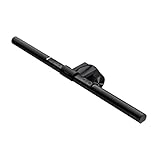
Monitor light bars are the sleeper pick. The BenQ ScreenBar was built to fix screen glare, not video calls — it clips on top of your monitor and throws light down at your desk without bouncing into the screen. But sitting right above your webcam, it also doubles as decent, zero-footprint fill light. It won't replace a key light in a dark room, but if your desk is already lit reasonably well, it needs no rearranging at all.
Budget pick vs. splurge pick
Already own a decent monitor and want minimal footprint: get the ScreenBar — it fixes glare and doubles as face light in one purchase. Sit close to the lens and want the cheapest real upgrade: the ring light does the job. Want the best actual result and don't mind a bigger bill: the Key Light Air, since adjustable Kelvin means no color mismatches and it's built to survive daily adjusting, unlike cheaper panels that droop within months. Save the softbox kit for people producing video regularly — not for a weekly leadership call.
The mistakes that undo good lighting anyway
- Sitting with a window behind you. The most common mistake, and free to fix — face the window instead, or close the blinds and let your key light do the work. A bright window behind you always wins the exposure fight.
- Mixing color temperatures. A warm lamp on one side and a cool ceiling light or window on the other creates a two-tone look. Pick one temperature, ideally 4500–5500K, for your whole face.
- Placing the light too low. Uplighting — a laptop screen glowing up at your face in a dark room — creates unflattering shadows across your forehead. Keep your key light at or above eye level.
- Forgetting your glasses. A light straight in front at eye height glares back into lenses. Angling it slightly off, per the 45-degree rule, usually clears the glare.
Good lighting deserves a webcam that can show it off
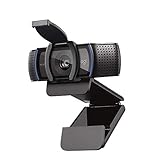
Here's what trips people up after fixing the lighting: they're still on a built-in laptop webcam with a tiny sensor that can't render the improvement — it leans on noise reduction and sharpening, which smears detail into a soft, plasticky look no matter how good the light is. An external webcam with a bigger sensor actually resolves the difference. The Logitech C920s has been the default answer to "what webcam should I buy" for years because it's reliably good, not flashy.
None of this needs to be complicated. One light in the right spot, at the right height, at one consistent color temperature, fixes most "why do I look so tired on camera" problems — usually a $50–130 purchase, not a studio renovation.
Frequently asked questions
Do I actually need a ring light for video calls?
Not necessarily. Ring lights work well if you sit close to the camera and skip glasses, but the round catchlight can show up as a distracting reflection in glasses or eyes on a wider shot. A monitor light bar or small panel key light is more flexible for most desks.
What color temperature is most flattering on video calls?
Somewhere around 4500–5500K reads clean and neutral on most webcams. Warmer light (2700–3000K) looks cozy in person but often skews orange on camera, especially mixed with cooler daylight from a window.
Where should I put my light if I only have room for one?
Just above or beside your monitor, angled down toward your face, roughly at or slightly above eye level. That single position fills in the shadows an overhead ceiling light creates, no second light stand required.
Why do I still look washed out or orange with a light I bought for this?
Usually a color temperature mismatch — your new light is a different Kelvin value than another source still hitting your face, like a window or a lamp. Block the competing source or match its temperature and the effect usually disappears.
Can I just use a window instead of buying a light?
Yes, if you face the window rather than sit with it behind you. Natural daylight is flattering, soft, and free — the problem is only when it's behind you, forcing the camera to expose for the window instead of your face. You'll still want a backup for evenings.
Do monitor light bars like the BenQ ScreenBar actually help with video calls?
Yes, as a side benefit. It's marketed for desk glare and eye strain, but sitting right above your monitor at close to eye height, it doubles as a modest fill light. It won't replace a key light in a dark room, but if your desk already has decent ambient light, it does real work without adding anything to it.