If your wrist hurts after a long workday, the mouse is usually the first place to look. A standard flat mouse forces your forearm into full pronation, basically the same position you'd use to pour a pitcher of water, except you're holding it for eight hours straight. That position pinches the median nerve, compresses the tendons that run through the carpal tunnel, and slowly turns minor irritation into the kind of pain that wakes you up at night. The good news is that switching mice can genuinely help. The bad news is that "ergonomic" is also a marketing word, and not every mouse with that label will actually fix anything.
This is the rabbit hole guide. Vertical mice, trackballs, trackpads, grip styles, wrist rests, and a quick checklist for when you should stop reading articles and go see a hand specialist. Let's get into it.
Why ergonomic mice work, and why they aren't magic
An ergonomic mouse changes the angle of your forearm. A vertical mouse rotates your hand into a handshake position (around 50 to 70 degrees), which keeps the radius and ulna bones parallel instead of crossed. A trackball moves the cursor with your thumb or fingers while your arm stays still. A trackpad eliminates gripping entirely. All three reduce the specific kind of strain that comes from extended mouse use.
What none of them do is fix bad posture, a too-high desk, a chair that doesn't support your forearms, or twelve hours a day of continuous clicking with no breaks. The mouse is one variable. If you swap it and your wrist still hurts after two weeks, the problem isn't the mouse. It's something further upstream.
Vertical mice: the easiest switch
Vertical mice are the most familiar option for anyone coming from a regular mouse. You still move your whole arm, you still click with your index and middle fingers, you still scroll with a wheel. The only thing that changes is the angle. Most people adjust within a day or two.
The Logitech MX Vertical is the one to beat. It's been the default recommendation in ergonomics circles for years for a reason: the 57-degree angle is the sweet spot (steep enough to help, shallow enough to feel familiar), the build quality is excellent, and the software lets you customize the buttons for whatever app you live in. It charges over USB-C, pairs with three devices, and the battery lasts about four months per charge. It's $100 and it's worth it.
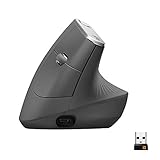
If $100 feels steep for an experiment, the Anker 2.4G Wireless Vertical Mouse is the budget gateway drug. It's not as polished as the Logitech (the buttons feel cheaper, the scroll wheel isn't as smooth, the software is non-existent), but it costs about $25 and gets the basic geometry right. Buy this one if you want to test whether vertical even works for you before committing to the MX. A lot of people do, and a lot of people then upgrade six months later.

Trackballs: when your shoulder hurts too
Trackballs are the next step. Instead of moving the whole mouse, you move a ball with your thumb (or fingers, depending on the model). Your arm doesn't move at all. This is huge if your pain extends past the wrist into the forearm, elbow, or shoulder, because most upper-arm strain from mouse use comes from the constant tiny adjustments your shoulder makes to track the cursor.
The Logitech MX Ergo is the trackball that converts skeptics. It tilts to either zero or 20 degrees depending on how you set it up, the thumb ball is precise enough for normal work (don't try to do photo retouching with it, but spreadsheets and writing are great), and it has the same multi-device pairing as the MX Vertical. The first three days feel weird. By day five, you're faster than you were with a regular mouse for everything except gaming.

If you want a finger-operated trackball instead of thumb (some people find finger trackballs more natural, especially if your thumb already gets tired), the Kensington Expert Mouse is the classic. It uses a billiard-ball-sized trackball that you roll with all four fingers, plus a scroll ring around the ball. It's been in continuous production for over twenty years because it works.

Trackpads: the quietly underrated option
If you have a Mac and you're already comfortable with the trackpad on your laptop, an external Magic Trackpad is one of the best ergonomic solutions you'll ever try. There's no grip required, gestures replace most of the clicking you'd normally do, and you can move it around your desk freely so you're not locked into one wrist position all day. The catch is that it's macOS-first (Windows support exists but is limited), and trackpads have a learning curve if you've never used gesture-driven navigation before.
For Windows users, the equivalent option is harder to find. Most third-party Windows trackpads are mediocre. If you live on Windows and want to ditch the mouse entirely, a trackball is usually the better path.
The wrist rest that matters more than you'd think
Whatever pointing device you end up with, your wrist still has to rest on something while you type. A flat desk edge digs a hard line across the soft tissue at the base of your palm and slowly compresses the carpal tunnel. A wrist rest distributes that pressure across a wider area. It's a $20 fix for a problem that costs people thousands in physical therapy.
The Gimars memory foam set comes with one for the keyboard and one for the mouse, both with non-slip bases and a gel-foam fill that holds its shape. They're not glamorous and they pick up dust, but they work, and they're cheap enough that you can replace them every couple of years without thinking about it.

Palm vs claw vs fingertip: pick the grip that matches your hand
This is the rabbit hole part. Mouse grip styles are a whole subculture, but the basics are useful for picking the right shape.
Palm grip means your whole palm rests on the mouse, fingers laid flat. This is the most common grip and the most relaxed. It needs a larger mouse with a high arch (the Logitech MX Vertical and MX Ergo are both palm-grip friendly).
Claw grip means your palm touches the back of the mouse but your fingers arch up like a claw, with just the fingertips on the buttons. This is faster for clicking but more tense. It works with smaller, flatter mice.
Fingertip grip means only your fingertips touch the mouse, with the palm hovering. This is the most precise and the most fatiguing. Mostly used by competitive gamers and very few productivity workers should bother.
If your wrist hurts, palm grip with an ergonomic shape is almost always the answer. Claw and fingertip grips put more strain on the small muscles of the hand and aren't worth it unless you're optimizing for esports.
The other variables: DPI, mouse pad, desk height
A few quick fixes that compound with whatever mouse you pick.
Turn your DPI up. If you're moving your mouse a long distance to cross the screen, your shoulder is doing more work than it needs to. Higher DPI means smaller physical movements for the same cursor distance. Most ergonomic mice support 1600 to 4000 DPI; experiment until you can cross your monitor with a flick of the wrist instead of a sweep of the arm.
Get a real mouse pad. A large desk mat that covers the whole working area lets your forearm rest on a soft surface instead of a hard desk edge. It also gives the sensor a consistent surface to track on. Anything in the 31-by-15-inch range works.
Fix your desk height. When your hands are on the keyboard, your elbows should be at roughly 90 degrees with your forearms parallel to the floor. If your wrists are angled up to reach the keys, your desk is too high. If they're angled down, it's too low. This matters more than the mouse.
When to stop reading articles and see a hand specialist
Most wrist pain from mouse use is mechanical and responds to the kind of changes above. But some symptoms mean you've crossed into territory that needs an actual medical opinion, not another Amazon order.
Red flag symptoms: numbness or tingling that wakes you up at night, especially in the thumb, index, or middle finger. Loss of grip strength (dropping things, can't open jars). Pain that radiates up the forearm into the elbow or shoulder. Swelling at the wrist. Symptoms that persist for more than three or four weeks after you've changed your setup.
If any of those apply, see a hand specialist or occupational therapist, not a general practitioner who'll give you a wrist brace and call it a day. Carpal tunnel syndrome and cubital tunnel syndrome are both progressive if untreated, and the conservative interventions (splinting, targeted PT, sometimes a steroid injection) work much better when caught early. Surgery is a last resort and a hand specialist will tell you that before recommending it.
One more piece of unsolicited advice: track your symptoms in a notes app for two weeks. Time of day, what you were doing, which hand, severity from one to ten. When you do see a doctor, that data is worth ten times whatever you'd say from memory in the appointment.
FAQs
How long does it take to get used to a vertical mouse?
Most people adapt within two to three days. The first day feels awkward, the second day feels manageable, and by the end of the first week it feels normal. If you're still struggling after two weeks, the mouse might be the wrong size for your hand, not the wrong style.
Are trackballs really better, or just different?
For people whose pain extends into the forearm, elbow, or shoulder, they're genuinely better because your arm doesn't move. For people with isolated wrist pain, a vertical mouse is usually the easier switch and equally effective.
Can a wrist rest cause more problems than it solves?
Only if you're resting your wrist on it while actively typing or mousing, which compresses the carpal tunnel against the surface. Wrist rests are for between bursts of activity, not during. Float your wrists when you're actually moving.
Is a gaming mouse bad for ergonomics?
Not inherently. Many gaming mice are designed around long sessions and have decent ergonomic shapes. The problem is that most are tuned for claw or fingertip grip, which is harder on the small muscles of the hand. If you're a productivity user, a palm-grip ergonomic mouse beats a gaming mouse for daily comfort.
Should I switch hands to give my dominant wrist a break?
Some people do this and it works. Expect a frustrating two-week adjustment period for the non-dominant hand. A more sustainable fix is to alternate between a vertical mouse and a trackball on the same hand, which uses different muscle groups without the productivity hit of switching dominance.
Will an ergonomic mouse fix existing carpal tunnel syndrome?
It can prevent it from getting worse and reduce daily symptoms, but it won't reverse nerve damage that's already happened. If you have diagnosed carpal tunnel, the mouse is part of the solution along with splinting, PT, and sometimes a medical procedure. Don't expect Amazon to fix a real diagnosis.
Does it matter if the mouse is wired or wireless?
Not for ergonomics. Wireless gives you more freedom to position the mouse comfortably without cable drag, which is a small but real benefit. Battery life on the recommended models above is months, not days.