There is a whole genre of desk lamp content on the internet that is basically just vibes. Warm amber glow, a linen shade, golden hour through a window. Great for Instagram. Useless if you actually need to see what you're doing. This article is for people who sit at a desk for six, eight, ten hours and need light that doesn't make their eyes feel like sandpaper by 3pm. The good news: the best solutions are not expensive. The bad news: most of what's marketed as "workspace lighting" is still designed around aesthetics first and ergonomics never.
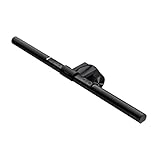
- Top pickBenQ ScreenBar Monitor Light~$120
- Best budgetAnker Cable Management Box~$26
- Worth the splurgeSony WH-1000XM5 Noise Cancelling Headphones~$398
The numbers that actually matter: CRI, color temperature, and lux
CRI (Color Rendering Index) measures how accurately a light source renders colors. Scale 0–100, sunlight is 100. Cheap LED strips often hit 70–75, meaning colors look slightly off and your eyes work harder. For desk work, you want CRI 90 or above. The BenQ ScreenBar? CRI 95.
Color temperature in Kelvin: 2700K is warm yellowish light — good for living room, terrible for reading. 4000K is neutral white, the sweet spot for most desk tasks. 5000K–6500K is cool daylight, good for detail work but rough on the eyes for long evening sessions. Most good desk lamps let you switch between 3000K and 5000K.
Lux is how much light hits the surface. OSHA recommends 300–500 lux for office tasks. The BenQ ScreenBar at 50cm throws about 1000 lux on the desk — bright enough for serious work without destroying the room vibe at 8pm.
Monitor bar vs. traditional desk lamp
A traditional desk lamp sits to one side, throws light in a general direction, and creates glare on your monitor if not positioned carefully. Most people put their lamp slightly wrong and live with a vague reflection bouncing off their screen for years without connecting it to the reason their eyes feel tired every afternoon.
A monitor light bar mounts on top of your monitor, shines light downward onto your desk, and uses asymmetric optics so zero light hits the screen. No glare. None. Your screen stays the reference point. It also frees up desk real estate you didn't know you wanted back.
Clamp vs. base: which mounting style is right
Clamp lamps attach to the desk edge — ideal if your desk is thick enough (most clamps handle 1.5–2.5 inches), you want to reclaim desk surface, and you move things around. Downside: clamps on thin desks (IKEA Linnmon) can wobble over time.
Base lamps sit on the desk surface. More stable, easier to reposition. Take up footprint, which matters more than people think.
For most setups: the monitor bar wins outright. For setups without a monitor (drawing, crafts), a clamp lamp at 45 degrees to your dominant-hand side gives the best shadow-free coverage. USB-C power is worth mentioning: any lamp that draws power from your monitor's USB port means one fewer wall outlet and one fewer cord.
The ambient layer: what to put behind you on video calls
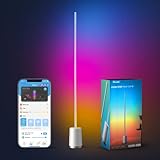
Monitor bars solve the task lighting problem. They don't solve the "I look like I'm being interrogated in a cave" problem on Zoom. For that you need a light source in front of you — meaning behind your monitor, facing you. A floor or corner lamp on a dimmer providing soft fill from the front is the better approach over a ring light.
What to skip: the cheap LED bar problem
There's a category of product — usually $20–$35, usually a brand you've never heard of — that looks like a monitor light bar and functions like a source of headaches. The tells:
- No CRI listed or CRI listed as "Ra80" — below threshold for comfortable extended use
- Flicker. Cheap LEDs driven by cheap drivers flicker at 100–120Hz, below conscious perception but above the threshold for eye fatigue. Quick test: point your phone camera at the lamp — if you see bands or pulsing in the camera feed, it's flickering.
- Blue-heavy 6000K "daylight" with no ability to warm it up. High blue-spectrum light at night suppresses melatonin.
- Clip mechanisms that don't grip. Cheap clamp lamps slowly tilt over the course of a week — an everyday annoyance that compounds fast.
The full desk setup: lighting that works all day
The lighting layers that work: Task: BenQ ScreenBar on the monitor — your workhorse. Ambient: Corner floor lamp on a dimmer at 3000–4000K during video calls, warm 2700K for evening work. Overhead: If you control your overhead (smart bulb, not fluorescent), set to 3000–4000K and use a dimmer. Total cost including ScreenBar and an ambient lamp: under $175.
Is the BenQ ScreenBar actually worth $120 vs. a $30 monitor bar?
Yes, and it's not close. The $30 alternatives have measurable flicker, no CRI data (or CRI around 80), and optics that throw light at the screen as well as the desk. The ScreenBar's asymmetric optics and CRI 95 reflect a real engineering difference, not brand premium.
What color temperature should I use for desk work?
4000K neutral white is the sweet spot for daytime desk work. Shift to 3000K warm in the late afternoon. Only use 5000K+ for short sessions on detail-heavy tasks like photo editing or fine drafting.
Does desk lighting really affect eye strain?
It's real. The main culprits are glare on the monitor, insufficient task lighting forcing your eyes to work harder, and flickering from cheap LED drivers operating below conscious perception. A CRI 90+ lamp at the right color temperature with zero screen glare genuinely reduces afternoon eye fatigue.
Can I use a BenQ ScreenBar with an ultrawide or curved monitor?
Yes. BenQ makes a ScreenBar Halo version designed specifically for curved monitors. The standard ScreenBar works fine on most flat monitors up to 35 inches. The clip is adjustable and the bar is 45cm wide.
What's the simplest lighting upgrade if I just want one change?
Replace whatever bulb is in your desk lamp with a 4000K LED rated CRI 90+. Search for "CRI 90 4000K LED A19" and pick one from Philips or GE. It costs $8–$15 and the difference in how the light feels is noticeable immediately.
Do I need to worry about blue light for evening work?
More than many people realize. High color temperature (5000K–6500K) has significant blue-spectrum that suppresses melatonin. If you're working after 7pm, set your lamp to 2700K–3000K. The BenQ ScreenBar goes down to 2700K. Also enable Night Shift or f.lux on your monitor.